
No App Store Necessary.
Log-in & Save the Web Link to your device.
Find us anytime, 24/7 on any web-enabled device
www.app.truckbed.ai
iPhone Instructions:
1. Open TRUCKBED in Safari
2. Tap the Share icon.
3. Scroll down and tap Add to Home Screen
4. Tap Add

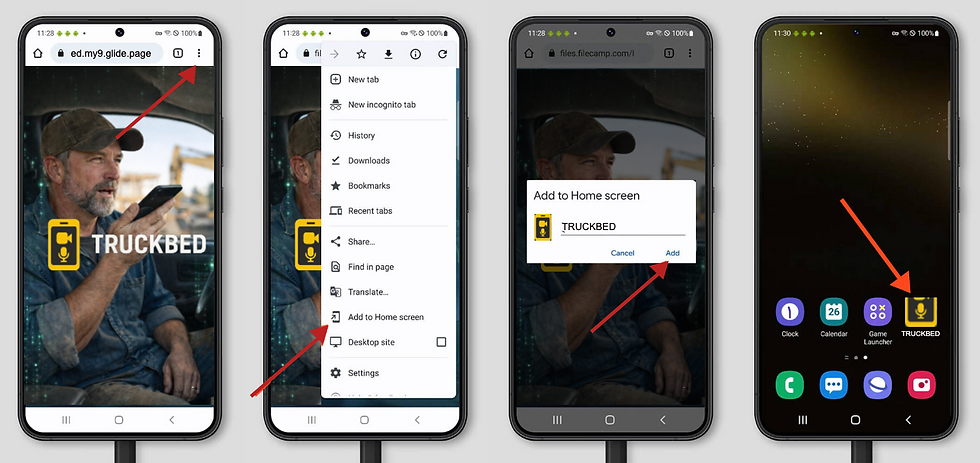
Android Instructions:
1. Open TRUCKBED in Chrome
2. If prompted, tap Install App
3. Choose Add to Home Screen or Install App
4. Tap Add
PRO TIPS:
Your phone just became the smartest tool on the job. Take pictures, videos, voice notes, track materials, or just talk through your work — then dump it all into Truckbed. We'll handle the rest.
Use it to:
-
create and track jobs
-
save quick voice notes from the field
-
capture what was said, promised, priced, or changed
-
keep job details from getting lost between calls, texts, and walk-throughs
Voice Notes - Speak up.
Don't write it down. Record it. Leave lots of short notes instead of one long note at the end of the day.
Examples:
-
“Mrs. Carter wants the vanity moved left if plumbing allows.”
-
“Need 18 more feet of baseboard in the back bedroom.”
-
“Customer asked about upgrading to quartz. Need revised price.”
-
“Water damage behind shower wall. This may increase scope.”
Get Started - Your first job.
Don't wait until the job is perfect. Build out details when you get started with:
-
a homeowner project
-
a service call
-
an estimate
-
a remodel
-
a punch-list job
-
even a job you are still bidding
Suggested simple steps
-
Tap New Job, add an image
-
Give it a clear name
-
Add basic details if you have them
-
Use voice notes as things come up
-
Add images, notes, and receipts. Build a file over time.
Use Before, During, and After.
Before the visit
-
create the job, add a few notes for the future you
During the visit
-
leave 1–3 short voice notes
-
Snap a few pictures
Before you drive away
-
leave one final note with next steps, pricing thoughts, or open questions